All blog posts
Published on
02.08.2023
How do I create an e-learning course

Norma Demuro
E-Learning Expert, CEO @ keelearning
description

The success of companies will increasingly depend on the extent to which they are able to generate and transfer knowledge. For knowledge transfer, e-learning courses are a great option. However, if you don't know how to create an e-learning course, this task can be daunting.
If you decide to switch to e-learning, you have many options. You can hire a third-party provider to create your course, buy pre-made content, or create courses yourself. Regardless of whether you are creating e-learning courses for the first time or want to perfect your methods, this guide is just right for you.
Now it gets practical: How do you create an e-learning course? We will guide you through each step, drawing on our industry-specific best practices and experience.
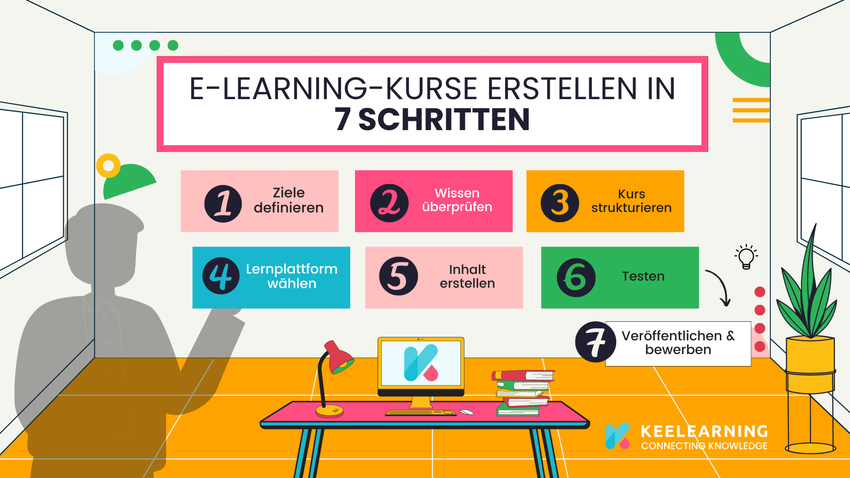
Here are some steps to help you conceptualize & create a successful e-learning course:
- Define your goals and your target audience.
- Check your knowledge.
- Structure your course.
- Choose a learning platform.
- Create your content.
- Test your course.
- Publish and promote your course. Our e-learning software keelearning reliably ensures that your learners are informed about new e-learning courses with email notifications and push notifications.
These are the basic steps to create a successful e-learning course for quick readers. If you want to delve a little deeper into the matter, read the following section:
How to design an e-learning course concept
Who should create content for an e-learning course?
You are switching to e-learning and would like to create your own e-learning courses. But shouldn't the responsibility for creating e-learning courses lie with the L&D (Learning and Development) team, or can you benefit from employee-generated courses?
L&D is often seen as the task of the instructional designer. In fact, this was typical in the early days of e-learning, when course development was still a technical challenge. With today's technology, it is easier than ever for your employees to create their own learning content.
With a modern, intuitive authoring tool, employees can create their own training materials and share them with their colleagues. This is the optimal method for creating e-learning courses because it leverages the knowledge already present in your company.
Since your employees have first-hand experience, they create the most relevant content. In this model, your L&D team supports your employees in creating relevant, engaging, and effective learning content.
What are the benefits of internally created e-learning courses?
- Faster and more efficient. You don't rely on a few experts, but outsource the creation and delivery of learning content to experienced employees in your company.
- Cost-effective. You save the costs of having courses created by external instructors, programmers, or designers.
- Flexible. The content is created by employees who know the company well.
- High quality. With employees as subject matter experts, you use real-world knowledge and experience that is relevant to your learners. It is your L&D team's job to ensure the quality of your content and teach your employees how to create even more effective content. To get started with creation right away, keelearning offers an integrated course library that provides both ready-made courses on topics such as compliance, as well as various templates and didactic tutorials for your content team. This increases the engagement of employees and learners. Content authors are seen as experts in their field and receive recognition. Learners find the content more relevant and see a clear connection to their everyday work.
- Retain valuable employee knowledge. Knowledge remains available for future generations of employees, even if experienced employees have left the department or the company.
Before you create your first e-learning course
Identify your company requirements
Before you create content and even before you decide on a tool, you need to define and understand the requirements you want to meet. The key to learning is to provide employees with the skills and knowledge they need to improve their performance.
When you start with e-learning, it is a good idea to talk to employees to better understand the areas in which further training is needed. Sometimes the results are obvious. For example, if your company updates its products regularly and launches new products, training for sales and technical support is an important consideration. If you know what you want to achieve, you will also know who should create the e-learning content.
Choosing an e-learning tool
If your company is using e-learning for the first time, you need to decide which software you want to use to create and deliver online courses.
When choosing e-learning tools, it is important to understand who the learners are and what is important to them. How will they interact with the course? Do you need mobile optimization? What accessibility do you need? Does the content need to be updated regularly? And similar questions.
Most companies combine an LMS with a proprietary e-learning authoring tool. This way, you can leverage the specific features of both tools to create and distribute learning content.
Well-known providers include, for example:
- keelearning
- 360learning
- elearnio
- iSpringlearn
A full overview of e-learning software and how to choose the right one for you can be found in our e-learning platform comparison.
If you have a tight budget, make sure that your LMS already has an integrated authoring tool. keelearning offers both an authoring tool and an LMS in one software. So, you don't have to decide. Furthermore, as a mobile LMS including an app, keelearning is the first choice for remote teams and first-line workers.
Don't feel like sifting through endlessly long software comparisons? Simply schedule a free, non-binding demo appointment with us and let us find out if we are a match.
Creating e-learning courses yourself: Step by step
1. Formulate learning objectives & define target group
Before you begin creating your course, you should clarify who your target audience is and what you want to achieve with your course. This will help you determine the content and scope of the course. The learning objective is to be clear about what learners should learn from the course. Learning objectives are specific and should be communicated to learners at the beginning of the course. This way, misunderstandings about the learning goal can be avoided. Keelearning offers a practical standard function in the software for course design: the Course Creator. The authoring tool helps course developers define specific learning objectives through templates and already ready-made customizable courses. This way, they can make their courses easier to understand.
2. Check your knowledge
Check whether you have the necessary expertise to create an e-learning course. If not, you should consult an expert from the relevant specialist department before you begin.
3. Evaluate learning content before you create content
You now know the goals of your course. Now you need to create an assessment that documents learning success. This gives you the opportunity to evaluate and improve the e-learning course. We do this before we create the learning content, in order to include only content that helps achieve the learning objective.
Tests (e.g., quizzes or other tasks) measure how well learners have absorbed the information conveyed in the course. Always remember that the results reflect not only the abilities of the learners but also the quality of the course. If, for example, the course does not fully explain the necessary background information, users will not be able to repeat the learning content.
There are many assessment methods. Use a variety of peer assessment methods throughout the course, as variety has been shown to increase user engagement and learning success. In peer assessment, members of a specific group (such as learners) evaluate each other's learning process results. In doing so, learners can also cooperate with experts, such as high-performing learners, and get targeted support. Choose your evaluation method carefully; some are better suited for certain learning content than others.
Each of these methods is very effective in the right context. When developing assessments, make sure to give learners immediate feedback that acknowledges their performance but also encourages them to look for the right answers if they find the task difficult. You can also provide help to learners via feedback so that they reach the learning objective faster.
4. Create course
There are more ways to create an e-learning course than simply uploading a PowerPoint presentation. If you want to use pre-made slides, you can convert your PowerPoint files into electronic learning materials with keelearning. To help you create your own e-learning course, we have prepared the following steps for you:
4.1 Write content
Observe the basic rules of good writing. Sentences (no more than 20 words) and paragraphs should be as short as possible. Address topics concretely and try to highlight the essential aspects. Limit your video to 5 minutes or less, otherwise you will lose the learners' attention. Questions should be answered quickly. Ideally, it should take learners no longer than 30-45 seconds to answer the questions.
4.2 Structure and design
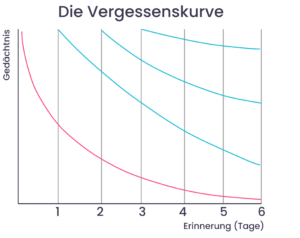
Knowledge in small pieces. It is helpful for learners if you break information down into small blocks (“micro-learning”). The course should not exceed 1000 words. Use different course structures, because variety helps learners remember content better. Using different structures for different parts of the course can "lower the forgetting curve" (Keelearning offers you the possibility to choose between different perspectives and methods, allowing you to differentiate your course). There should be images and graphics that match and support the content. In general, the shorter the content, the better. Because learning in short, manageable time segments is more effective than long texts or long presentations. If your course is difficult to fit into this limited framework, you can also split it into multiple courses.
4.3 Get feedback from colleagues
Four eyes see more than two. This also applies to the creation of online courses. If you create learning content that has been worked out by employees, invite a group of experienced employees to contribute to the course or to review the work of others. This way, all important content is taken into account. Together, they can gather valuable feedback and suggestions for improvement. In this way, colleagues can ensure that the course content is correct and up-to-date.

4.4 Publish course
When you and your colleagues are satisfied with the course, you can publish it. How you publish your course depends on the tools you use. Usually, you create the course with our Course Creator within keelearning or a development tool and upload it as a SCORM or xAPI package. Then you can upload it to your Learning Management System (LMS).
Your employees can then access the course via the keelearning LMS. The LMS tracks their results and issues certificates. Even though your course has now been published, you must continue to work on it. It may need to be updated regularly, which brings us to the next section.
5. Implementation and updating of e-learning courses
Continuously collect feedback to improve your course.
Now you know how to create an e-learning course. Now it is important to keep it up to date. Once a course has been approved, you should collect feedback from learners to understand how effective the content is. These evaluations provide authors with valuable information to optimize the course and ensure that it meets the needs of the students. A simple but effective way to measure the success of a course is a simple survey called Net Promoter Score (NPS).
At the end of the course, learners are asked a simple question: “On a scale of 1 to 10, how likely are you to recommend this course to your colleagues? Depending on which number they choose, students are assigned to one of three categories:
Promoters (9 to 10 points): Users who find the course very useful and are likely to recommend it to their colleagues.
Passive (7 to 8 points): Users who like the course but are rather neutral towards it. They will neither encourage nor discourage others.
Detractors (0 to 6 points): Users who did not find the course helpful. They may even discourage others from participating. To calculate the NPS for your course, subtract the percentage of detractors from the percentage of positive ratings.
The NPS is a useful metric because it gives you an idea of how useful your course is. If a course has a low NPS, it is a sign that changes are necessary. After you have made the changes, you can use the NPS to check whether they have had the desired effect.
Update your course
The development of a course does not end with its publication. In a way, it begins with the definition of learning requirements, and as topics change, content must be constantly updated and adapted.
One of the main advantages of e-learning is that course content can be updated quickly and frequently. Employees also possess the necessary specialized knowledge of your company. This ensures that training content is tailored to the specific business requirements of your company.
Keep up to date with the latest and most relevant events. If necessary, repeat the evaluation before updating. Get regular feedback to further improve your content. This is how you ensure good quality.
How to create a course with keelearning
Now let's see how to create a course with keelearning. Creating a course with keelearning follows a simple five-step process:
Step 1: Get creative. Use the intuitive authoring tool to enter content and create courses. You can add text, image, video, and audio files as well as task types. When creating a course, you decide whether you want to divide the content into several modules. The integrated templates support you in defining the course topics. This way, you can check at any time whether the content fits your course.

Step 2: Design. Afterwards, you can expand your course with individual themes, such as your company's corporate design.
Step 3: Configure. Now you can make various course settings. These include target group settings, i.e., who should have access to the course, start and end dates, settings for repeating courses, passing scores for tests, language settings, certificate export, and much more.
Step 4: Publish. Now you make your course available to learners in the keelearning LMS and in the app.
Step 5: Results. You can track learners' performance with the help of integrated statistical functions. This way, you can automatically certify learners, measure learning progress, and optimize course content as needed.
Now you're ready to start
Now you are ready for your first online learning experience. First, apply some of the tips from this article. As you can see, online learning offers many advantages, from cost savings and higher efficiency to faster development and better learning outcomes. Your new e-learning strategy, especially if you include employee-generated learning, is a smart investment in the future of your company. With e-learning from keelearning, your company can easily meet the training needs of today's workforce. At the same time, you build a strong knowledge base to protect valuable knowledge in your company.
For e-learning to achieve effective results in your company, you need targeted preparation. With our e-book, we give you 10 valuable tips on what matters and where you should start.
Download: E-Book Strategic E-Learning Planning in 10 Steps

Schedule a free online demo today and find out how keelearning can support you in introducing e-learning in your organization.
Table of Contents
Ready for training that works?
Get to know keelearning in a personal demo – no obligation and tailored to your needs.





The learning platform for businesses looking to make their training simple, mobile, and accessible to all – with no IT overhead.