All blog posts
Published on
09.03.2026
Digitizing customer training & onboarding successfully: Benefits, measures, tools

Lisa Kubatzki
Senior Content Marketing Manager @ keelearning
description

The future is digital, and the future is now. This also applies to customer training. While product training used to often take place in person or in long support calls, more and more companies are relying on digital learning platforms to onboard their customers efficiently.
There is a simple reason for this: well-structured digital training saves time, reduces support efforts, and ensures that customers can work successfully with a product faster.
Whether it’s SaaS onboarding, product training, or a knowledge base – with digital customer training, you create a scalable solution that relieves both your team and your customers.
In this article, we show you:
- why digitizing customer training is worth it
- which tools are suitable for this
- how you can bring your training online step by step, e.g., in a customer academy
- and with which formats your customers really enjoy learning
- Digital customer training saves time, costs, and support efforts.
- Customers can access learning content at any time and become productive faster.
- Companies maintain a better overview of knowledge levels and progress.
- Learning platforms like Keelearning, Reteach, or 360Learning help with implementation.
- Interactive formats such as videos, product tours, and quizzes increase motivation and learning success.
Why you should digitize your customer training & customer onboarding
Efficiency and time savings
Digital training allows knowledge to be created once and used indefinitely. Instead of conducting every customer onboarding individually, your customers can work through content independently – exactly when they need it.
Cost savings
In-person training, individual support appointments, or repeated introductory workshops incur high costs. Digital learning offerings significantly reduce travel, personnel, and training costs.
Fast & standardized onboarding
With digital training, you ensure that all customers receive the same information. This avoids knowledge gaps and creates consistent quality in the onboarding process.
You bring all customers up to the same level
Especially with complex products or software solutions, it is important that all users understand the basics. Digital training helps establish a common level of knowledge.
High scalability
If your company grows, the number of your customers grows too. Digital training can be easily rolled out to hundreds or thousands of users – without additional training effort.
You can find out which mistakes you should avoid when you want to scale your customer training in our article.
Updates cost less effort
If your product changes or new features are added, you can update learning content quickly. Customers automatically access the latest version of the training.
Fewer queries & customer support tickets
Well-structured training answers many questions in advance. This reduces support tickets and takes the burden off your Customer Success team.
More control and overview of your customers' knowledge
With learning platforms, you can see exactly which content has already been completed and where there are still knowledge gaps. This allows for more targeted support.
Higher customer satisfaction & loyalty
Customers who can quickly understand and successfully use your product are more satisfied – and are more likely to stay with your company in the long term.
💡DATAflor already generated more revenue with their customer training in the first few weeks than in the previous quarter after they improved their training. Read the whole success story on our site!
3 tools with which you can digitize customer training and customer onboarding
Keelearning
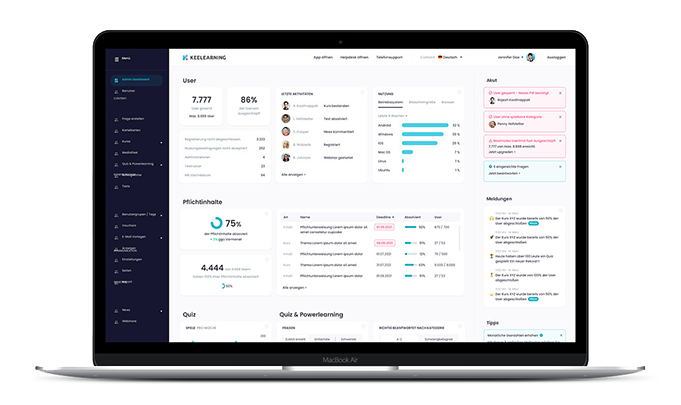
Keelearning is a modern learning platform specifically designed for companies that want to train employees or customers digitally. The platform combines an authoring tool, learning platform, and social learning features.
Helpful functions:
- Intuitive course editor for quick creation of learning content
- Support for various formats (video, text, quiz, images)
- Gamification elements to increase learning motivation
- Learning paths and automatic course unlocks
- Social learning functions such as comments or chats
- Progress analysis and reporting
- Mobile use via web or app
Reteach
Reteach is a learning platform with a focus on simple course design and structured learning programs. Particularly suitable for companies that want to offer learning paths and certifications.
Helpful functions:
- Drag-and-drop course editor
- Structured learning programs and modules
- Certificates upon completion of courses
- Progress tracking for learners
- Integration of videos and interactive content
- Participant management and reporting
- Community functions for exchange between learners
360learning
360Learning is a collaborative learning platform that focuses strongly on social learning and knowledge exchange. It is particularly suitable for organizations that want to create and improve learning content together.
Helpful functions:
- Collaborative course creation in a team
- Social learning functions such as discussions and comments
- AI-supported course creation
- Automatic feedback and improvement loops
- Integrations with enterprise software (e.g., HR tools)
- Learning analytics and performance tracking
- Automated learning paths and certifications
Introduce digital customer training in 8 steps
If you are thinking now: nice and good, but we don't have time for that... Then let yourself be convinced of the opposite. Because you can bring your customer training online in just 8 steps.
- Choose a tool for customer training. See which customer training software suits you best. Should it be an authoring tool with an integrated LMS or rather
- Collect customer questions & identify pain points. Find out what problems customers really have with your software, which questions come up again and again, and what consistently lengthens onboarding time. These pain points and frequent questions should then be resolved by your training.
- Develop a rough concept. Now you know roughly what customers should learn in your training or onboarding. Now create the structure of the training and think about how you want to design it didactically (we have recorded tips for this in this video).
- Create content. The biggest and probably most important step in digitizing your customer training and onboarding. Create your first course, make it interesting through gamification elements and variable formats (video, questions, images).
- Incorporate opportunities for knowledge consolidation. You could, for example, include quiz questions after modules or actively promote the comment function for content. Exchange between different team members or between the course manager and the customer via chat is also perfect for consolidating knowledge.
- Optional: Create learning paths for different customer segments. If your customers are at different knowledge levels, for example, or if you can divide your customers into different types (segments), create groups or tags and prepare individual learning paths for each customer segment to adapt the learning journey to their needs.
- Bring training live.
- Get customer feedback & optimize training. Customer training is not set up once and then finished forever. With the further development of your company and your product, your customers' needs regarding training also increase. So, always keep your training up to date and proactively ask where there is a need for optimization.
Tips for digital customer training that is fun
But how do you ensure that your customers don't just complete the training, but actually enjoy doing it? And how do you create knowledge that sticks? We have some tips for you to make digital training varied and entertaining; specifically with these formats that are suitable for customer training.
Interactive product tours
Learning by doing. Create a mockup of your software and let your customers click through it. This way, they not only see what the software looks like but can also experience firsthand what it feels like to use it.
Video tutorials
Many of us are visual learners. Especially when it comes to software, it is often worth showing in real-time what certain things look like and how they work. Learning videos are therefore a perfect tool for customer training, especially when learners can go back at any time and watch the video again if they have forgotten a step.
Level-up formats
Motivate your customers with the chance to level up. You can do this, for example, by only unlocking content after a module or course has been passed.
You can also create courses for beginners, advanced users, and pros, and thus let your customers level up.
Follow-up newsletter after passing a module or course
Send emails after modules or courses have been passed. These emails confirm completion or summarize the knowledge learned. You can also attach certificates that your customers can download.
Handouts/PDFs
It may always happen that customers want to recall what they have learned later. Therefore, it is worth providing handouts or PDFs that, for example, contain important instructions or short summaries. You can either send these handouts by email or make them available in the media library of your learning platform.
Feedback opportunities
Give your customers the opportunity to ask questions and leave feedback on the course. You can do this, for example, with a comment function under the course content or an integrated chat. This way, you not only prevent ambiguities from interrupting the customer training process but also promote contact between you and your customers.
Direct line to support for prompt questions
If your e-learning platform has an integrated chat, you can also guarantee direct contact with your support team to clear up questions exactly where they arise.
Blended learning formats
If you don't want to forgo your live/on-site training or want to give your customers the opportunity to meet you personally for training purposes, you can also combine your digital training with offline appointments (or webinars). This is called blended learning. Many customer training software programs have an appointment function integrated for this purpose.
Digitizing customer training & onboarding with keelearning
Ok, you are convinced that you want to digitize your training, but what is the concrete first step to bring your content online?
Let our sales team advise you in a non-binding demo and find out if keelearning is THE tool for you to start your customer training digitally now.
Book a demo & get to know keelearning
Key Takeaways
Table of Contents
Ready for training that works?
Get to know keelearning in a personal demo – no obligation and tailored to your needs.
Share
Lorem ipsum dolor sit amet, consectetur adipiscing elit. Suspendisse varius enim in eros elementum tristique. Duis cursus, mi quis viverra ornare, eros dolor interdum nulla, ut commodo diam libero vitae erat. Aenean faucibus nibh et justo cursus id rutrum lorem imperdiet. Nunc ut sem vitae risus tristique posuere.





The learning platform for businesses looking to make their training simple, mobile, and accessible to all – with no IT overhead.


